Touch Screen Toaster: A Practical Guide for Modern Kitchens

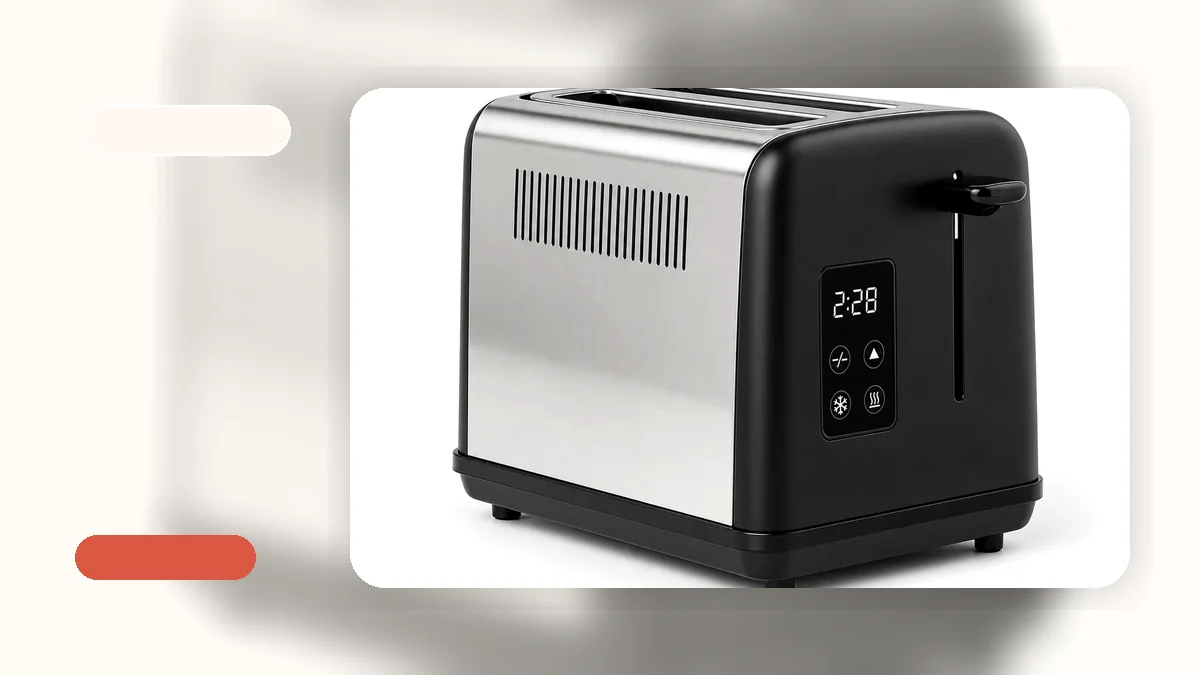
Touch Screen Toaster: How to Choose the Right One for Your Kitchen
A touch screen toaster replaces the traditional dial or lever with a flat, digital control panel you tap directly. If you have been looking at modern countertop appliances and wondering whether this style of toaster is worth it, this guide will walk you through how it works, when it makes sense, and what to look for beyond the screen. We will also cover who a touch screen toaster is best for—and who might be better off with a simpler design.
Choosing a toaster by bread type, kitchen size, breakfast routine, and budget still matters here. The interface is just one part of the decision. You can browse a wide range of toasters to compare styles before deciding whether a touch screen model fits your morning.
What Is a Touch Screen Toaster and How Does It Differ?
A touch screen toaster has a flat control surface—usually an LED or LCD panel—where you tap icons or swipe to select settings. This is different from a digital toaster that uses a screen but still relies on physical buttons or a dial. With a true touch screen, there are no raised buttons or rotating knobs on the control panel. You interact with the surface directly, the way you would on a smartphone or tablet.
In a typical touch screen toaster, you will see icons for common functions: toast, bagel, defrost, reheat, and cancel. Shade settings often display as a numbered bar or slider on the screen. Some models show a countdown timer or a digital readout of your selected browning level. Brands like Kalorik and Whall have adopted this interface, as have some models from Revolution and other makers.
Compared to a traditional toaster with a manual shade dial and a physical lever, the touch screen approach changes how you start your toast and how you adjust settings. Instead of turning a numbered knob, you tap a number on a screen. Instead of pressing a physical button for bagel mode, you tap a bagel icon. The underlying heating technology is similar—most still use standard electric heating elements. The difference is in the control layer.
If you are new to toaster categories altogether, our toaster buying guide covers the foundational terms like shade settings, slot width, and preset functions that apply to all styles.
Real Benefits: When a Touch Screen Toaster Makes Sense
The practical case for a touchscreen toaster comes down to a few specific things.
Easier surface cleaning. This is the benefit I think about most. A flat, smooth control panel is easier to wipe down than a toaster with raised buttons, textured dials, or crevices where crumbs settle. In my experience reading toaster complaints, cleaning around buttons and knobs is a regular frustration. A touch screen surface does not eliminate crumbs entirely—you still need a removable crumb tray—but the control area itself is simpler to keep clean.
Precise shade control with a clear readout. Instead of guessing what “4” means on a numbered dial, many touch screen models show your selection digitally. Some display a browning preview or a countdown. This does not guarantee more even toast, but it does give you a clearer sense of what you have chosen.
Preset functions with visible icons. Bagel, defrost, reheat, and cancel functions are labeled on the screen as icons. For users who switch between frozen waffles, bagels, and sandwich bread throughout the week, seeing those options laid out can be faster than memorizing which button does what on a traditional model.
Modern kitchen appearance. A flat glass or matte panel looks different from a toaster covered in plastic buttons. If your kitchen has a clean, modern style and you care about countertop appearance, this matters—though I would not recommend choosing a toaster on looks alone.
Potentially easier for some users. For people with limited hand dexterity or arthritis, tapping a flat surface may be easier than gripping and turning a small dial. This is not guaranteed for every model, but it is a consideration worth noting.
Practical Drawbacks and Limitations to Consider
I would not be doing my job if I only listed the advantages. A toaster touch screen comes with trade-offs worth knowing before you spend more money.
Higher price. Touch screen toasters generally cost more than comparable models with mechanical controls. You are paying for the display, the touch-sensitive panel, and the additional electronics. A basic 2-slice toaster with a dial might cost significantly less than a touch screen model with the same slot width and wattage.
Durability questions. Mechanical dials and levers have few moving parts. A touch screen adds electronic components—sensors, a display, a circuit board—that could be more sensitive to moisture, heat exposure, or impact over time. I am not saying touch screen toasters break quickly, but the potential failure points are different from a simple dial toaster. This is worth considering if you want a toaster that lasts eight to ten years without issues.
More careful cleaning required. While the flat surface is easier to wipe, you need to be careful about moisture. You cannot submerge a touch screen toaster, and excess liquid near the panel could cause problems. Always unplug the toaster, let it cool, and use a lightly dampened cloth—never a soaking wet one—near the control area.
Intuition varies. Some people find a physical dial more intuitive than a touch screen. You turn it, you feel the click, and you know where it is set. A touch screen requires you to look at the panel. For a first-time toaster buyer or someone who prefers absolute simplicity, a traditional control layout may feel more straightforward.
Screen visibility. In very bright kitchen light, some touch screens can be harder to read. This depends on the specific display quality, but it is worth checking in person if possible.
Key Features to Compare Beyond the Touch Screen
Here is what I tell anyone looking at a toaster with touch screen controls: the interface should not be the only thing you evaluate. The screen is the most visible feature, but the toaster still needs to handle your actual breakfast.
Slot width. Wide slots matter for bagels, thick bread, frozen waffles, and artisan slices. If you regularly toast anything thicker than standard sandwich bread, check the slot width before you check the screen. A beautiful touch screen on a toaster with narrow slots will frustrate you every morning.
Number of slices. A 2-slice touch screen toaster works well for one person or a couple. If you have a family of four eating breakfast at the same time, a 4-slice model saves real time—even if it takes up more counter space.
Countertop footprint. Measure your available counter space before buying. Touch screen toasters vary in size, and some modern designs are bulkier than they look in photos. If you are in an apartment or small kitchen, this matters a lot.
Shade settings range. Most touch screen models offer somewhere between 6 and 8 shade levels. More numbers do not automatically mean better toast, but a wider range gives you more control over light golden versus dark and crispy.
Crumb tray design. A removable crumb tray makes routine cleaning easier. Check whether the tray slides out smoothly and is easy to reinsert. Some touch screen toasters have trays that are harder to access because of the panel design.
Safety features. Auto shutoff, cool-touch housing, and a cancel button are standard on most models, but verify they are included. A cancel button on a touch screen is especially useful—being able to stop the cycle quickly is a safety feature, not just a convenience.
For help measuring your kitchen space and understanding which size fits best, our compact 2-slice toaster for small kitchens is a good reference point for understanding footprint.
Who Is a Touch Screen Toaster Best For? (And Who Might Not Need One)
A touch screen toaster is a good fit if you value precise control, prefer a smooth surface that is easy to wipe, and use multiple preset functions throughout the week. If you switch between bagels, frozen waffles, reheated toast, and regular sandwich bread, having those options displayed as clear icons on a screen can simplify your morning routine. It is also a reasonable choice if modern kitchen aesthetics matter to you and you are willing to pay a bit more for the look and feel.
A touch screen toaster may not be the best choice if you are on a tight budget. You can get a perfectly functional toaster with a dial for less money, and the toast quality often comes down to the heating elements and slot design, not the control panel. It is also not necessary if you eat the same type of toast every day with one or two shade settings. In that case, a simple dial does the same job without the extra cost or complexity.
If you are uncomfortable with electronics or prefer the tactile feedback of a physical knob, a traditional toaster will feel more natural. And if you are buying a toaster for a rental property, dorm room, or a space where the toaster might get rough treatment, simpler mechanical controls may be more durable in the long run.
A Note on Specific Models: Kalorik, Whall, and Others
You may have come across specific brand names while searching: the Kalorik Vivid Touchscreen Toaster, Whall touch screen toaster models, or a Revolution toaster with touch screen controls. These are examples of manufacturers who have adopted the touch interface for their toaster lines. Each brings its own design choices—screen size, preset options, slot width, housing material, and price point.
The Kalorik touch screen toaster, for example, tends to emphasize a visible digital display with preset icons. Whall models often focus on wider slots alongside the touch panel. Revolution toasters with touch screen controls typically position themselves in the mid-to-upper price range with additional features. These differences matter more than the presence of a touch screen alone.
When comparing any of these—or any model from any brand—the approach should be the same: look at the slot width for your bread type, the crumb tray design for cleaning, the shade settings for your preference, the countertop size for your kitchen, and the price for your budget. The touch screen is the interface, but the toaster still has to do its job. You can explore models like the stainless steel 2-slice toaster with touch controls to see how touch-style controls work in a specific design.
For the full range of available options, visit all toaster products to compare features side by side.
Frequently Asked Questions
Is a touch screen toaster better than a regular toaster?
It depends on what you prioritize. A touch screen toaster offers easier surface cleaning, precise digital shade control, and clear preset icons. A regular toaster with a dial is simpler, often more affordable, and has fewer electronic components that could need repair. Neither is universally better—it comes down to your budget, how you use your toaster, and whether the interface matters to your daily routine.
Are touch screen toasters hard to clean?
The flat control surface is actually easier to wipe down than toasters with raised buttons or textured dials, where crumbs tend to settle. However, you need to be careful not to let moisture seep into the electronics. Always unplug the toaster, let it cool completely, and use a lightly damp cloth near the screen area. The crumb tray underneath still needs regular emptying regardless of the control style.
Do touch screen toasters last as long as regular toasters?
Longevity depends on build quality, how often you use the toaster, and how well you maintain it. A touch screen toaster has more electronic components—sensors, a display panel, circuit board—compared to a simple mechanical dial. This means there are potentially more points of failure. With proper care, many touch screen models can last several years, but if long-term simplicity and durability are your top priorities, a mechanical toaster has a simpler track record.
What is the difference between a digital toaster and a touch screen toaster?
A digital toaster has a screen (often LED or LCD) and uses physical buttons to navigate settings. A touch screen toaster has a screen you interact with directly by tapping or swiping—no raised buttons. Both fall into the broader “digital” or “smart” toaster category. The main difference is how you control the settings: buttons versus a flat touch surface.
Which brands make good touch screen toasters?
Brands like Kalorik, Whall, and Revolution offer models with touch screen controls. However, the brand name alone does not tell you whether a specific toaster will fit your kitchen or breakfast habits. Always compare the slot width for your bread type, the shade settings range, the crumb tray design, and the overall countertop footprint. A good touch screen toaster is one that matches your actual daily needs, not just one with the most features listed.
Browse our full toaster collection to compare touch screen models alongside traditional styles and find the right fit for your kitchen.