Smart Toaster with Screen: Is a Touch Screen Model Right for You?

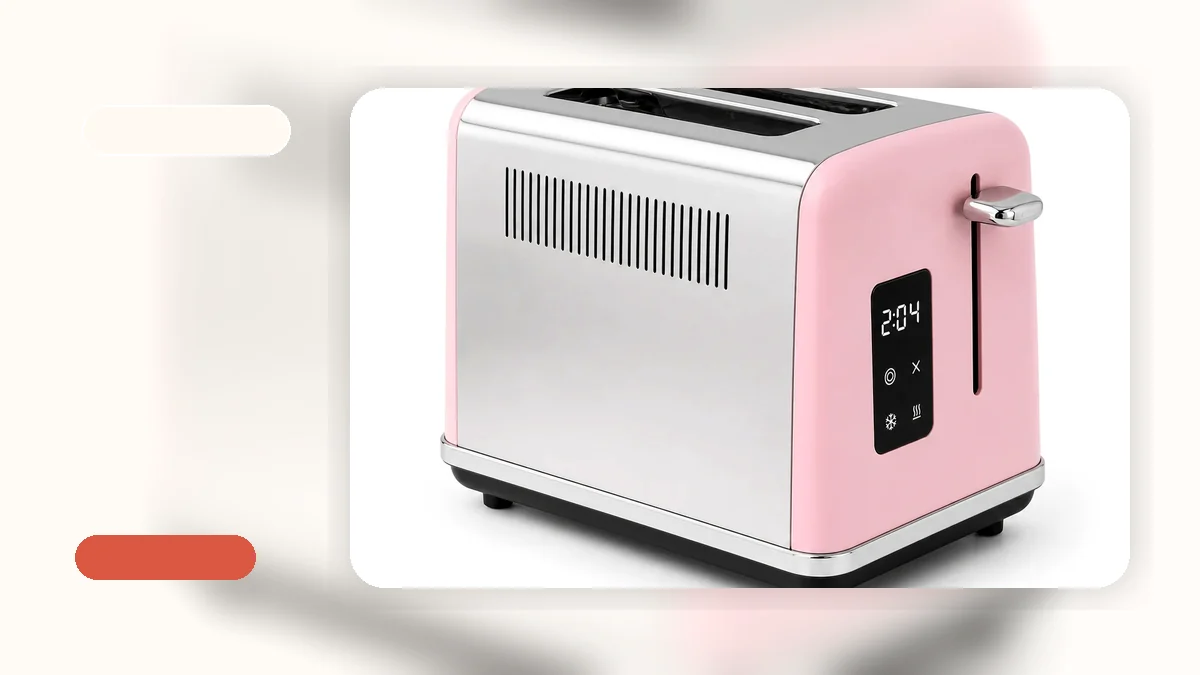
Smart Toaster with Screen: A Practical Guide to Touch Screen Features
A smart toaster with screen represents a modern take on a kitchen staple. Instead of simple dials and levers, these models use digital displays and touch controls to manage your toast. In this guide, we’ll break down what these features mean in real terms, helping you decide if a smart toaster with touch screen capabilities is a good fit for your mornings, or if a simpler model might serve you better.
What Is a Smart Toaster with Screen?
A smart toaster with screen is, at its core, a countertop appliance that uses a digital display—often a touch screen—to control toasting functions. Think of it as moving from an analog knob to a menu-driven interface. You might select your desired browning shade by tapping a number on a screen rather than turning a dial, or see a countdown timer for how long your bagel has left.
Common features found in a touch screen smart toaster include preset programs for bagels, defrosting frozen waffles, reheating a piece of toast that’s gone cold, and canceling the cycle mid-toast. The design often leans toward a sleek, contemporary look with stainless steel or clean-lined housing. While the modern aesthetic is nice, in Nora’s editorial experience, the real value is whether these digital controls actually make your breakfast routine clearer or just add another screen to wipe down.
You can explore our toaster collection to see a range of models, from basic to digitally advanced.
Key Features of Smart Toasters with Touch Screens
When evaluating a smart toaster, the screen is just the interface. The useful features are what it gives you control over. Here’s what to look for:
- Intuitive Digital Controls: A good touch screen should have clear icons and labels. You should be able to find the bagel setting or adjust the shade without a manual. Look for a menu that feels simple, not complicated.
- Precise Shade Selection: Many models offer more granular browning settings—sometimes 7 or more levels instead of the typical 5. This can be helpful if you’re particular about how light or dark you like your toast.
- Countdown Timer: A display that shows you how much time is left on the toast cycle is a practical, small benefit. It reduces the guessing game of “is it done yet?”
- Preset Programs: Dedicated buttons for Bagel, Defrost, Reheat, and Cancel are common. The Bagel setting, for instance, often focuses heat on the cut side. These presets are only useful if they match what you actually eat.
Don’t overlook the basics, either. A smart touchscreen toaster should still have reliable physical features like a high-lift lever for safely removing smaller items like English muffins, even heating, and a cancel button that works instantly. For a broader look at core features, you can read our toaster buying guide.
Who Should Consider a Smart Toaster with Screen?
A smart toaster isn’t a must-have upgrade for everyone. It’s a good match for specific users and kitchens.
Consider a smart toaster touch screen model if:
- You enjoy having precise, digital control over appliances and like the look of modern kitchen electronics.
- You regularly toast a variety of items (bagels, frozen waffles, artisan bread) and find preset programs genuinely save time and guesswork.
- Your kitchen has counter space for a slightly larger or more design-forward appliance, and the budget allows for the premium that digital features often carry.
A simpler model might be a better fit if:
- You’re in an apartment, dorm, or have a small kitchen. Compact countertop space is precious, and a basic 2-slice toaster does the job without extra bulk. You can see a compact toaster for small kitchens to understand that profile.
- Your breakfast is straightforward—mostly sandwich bread, and you’re happy with a simple dial. The added cost of a smart toaster won’t translate to better toast for you.
- You prefer fewer screens and simpler mechanical controls that are easy to operate half-asleep in the morning.
How to Choose the Right Smart Toaster with Screen
If you’ve decided a smart toaster fits your lifestyle, use this practical framework to narrow down your choice.
- Start with Your Bread: This is the most important filter. If you eat bagels or thick-cut bread like Texas toast, prioritize wide slots and a dedicated bagel setting. If you mostly toast standard sandwich bread, slot width is less critical. A smart touchscreen toaster should still be chosen by its ability to fit your food.
- Match Countertop Space: Measure your intended spot. Smart models come in 2-slice and 4-slice sizes. A 4-slice model with dual controls is great for families or couples who toast at the same time, but it takes up more room. For a solo user in a studio apartment, a 2-slice model is more practical.
- Evaluate the Interface: If possible, look at images or videos of the screen in use. Are the buttons labeled clearly? Does the menu make sense? A confusing digital interface defeats the purpose of convenience.
- Set a Realistic Budget: Smart toasters generally cost more than basic ones. Decide which digital features are worth paying for. A countdown timer is nice; a highly specific browning control might be essential if you’re particular. Avoid paying for features you’ll never use. You can check out a toaster with dual controls to see how a feature-rich but non-smart model is built.
- Check the Cleaning Details: A digital display doesn’t change the need for easy cleaning. Ensure the model has a removable crumb tray that’s simple to slide out and empty. This is non-negotiable for daily use.
Practical Considerations: Cleaning, Safety, and Cost
Owning a smart screen toaster involves the same real-world considerations as any toaster, with a couple of extra points for the digital elements.
Cleaning: The touch screen itself will need occasional wiping with a soft, damp cloth—never spray cleaner directly on it. More importantly, the crumb tray must be removable and easy to clean. Crumb buildup is a fire risk and can cause burning smells. A good smart toaster makes this basic maintenance simple.
Safety: Always unplug the toaster and let it cool completely before cleaning. Look for safety features like auto shutoff, which turns the toaster off if it jams or overheats, and a cool-touch housing that reduces burn risk on the exterior. These are fundamental, regardless of how smart the toaster is.
Cost vs. Value: Be honest about the value proposition. The premium you pay for a smart toaster is for digital controls and design. If those features don’t solve a real problem in your morning routine—like making it easier to get your preferred shade of toast consistently—the cost may not be justified. For many, a reliable mechanical toaster is the better investment.
You can browse all toaster products across our store to compare options and price points.
Frequently Asked Questions about Smart Toasters with Screens
Are smart toasters with screens better than regular toasters?
“Better” depends entirely on what you need. A smart toaster offers convenience and precise control through digital menus and presets. A regular toaster offers simplicity and often a lower price point. If you toast a variety of items and value seeing exact shade levels and timers, a smart model might be better for you. If you toast basic bread and want the most straightforward, affordable appliance, a regular toaster is likely the better choice. It’s about matching the tool to the job.
How do I clean a smart toaster with a touch screen safely?
Safety first: always unplug the toaster and let it cool completely. Use a soft, dry or slightly damp cloth to wipe the touch screen. Never use abrasive cleaners or submerge any part of the toaster in water. Remove the crumb tray, empty it over a trash can, and wipe it out before replacing it. Regular crumb removal is essential for performance and safety.
What features should I prioritize when buying a smart toaster?
Prioritize the features that align with your breakfast habits. First, ensure the slot width and configuration (2-slice vs. 4-slice) fit your bread and household size. Second, look for a user-friendly touch screen interface you find intuitive. Third, confirm it has the specific presets you’ll use, like Bagel or Defrost. Fourth, don’t neglect the basics: a removable crumb tray, reliable browning settings, and safety features like auto shutoff. A well-designed toaster should be simple to use, easy to clean, and clear to control.
Browse smart toasters with screens to find one that fits your morning routine →